Independent since 2019 · No paid placement, ever Prices re-checked weekly
Guides 5 min read

iPhone eSIM Transfer: How to Switch Carriers Without Losing Service

Moving carriers on an eSIM iPhone takes minutes and almost never needs a shop. The risk is not difficulty — it is doing the steps in the wrong order.

Jean Gilles
Founder & Lead Analyst, ShopCellPlans
Published September 12, 2026
Updated September 12, 2026
Two lines can live on the phone at once, which is what makes switching safe.

An eSIM is a SIM built into the phone rather than a chip you slot in, and it changed switching carriers from a postal exercise into a ten-minute one. It also introduced a new way to get it wrong, because there is no physical card to tell you which line is which — and the difference between moving a number and cancelling one is a single step in the wrong order.

Key takeaways
Moving a line to a new iPhone and moving a number to a new carrier are different processes — only the first uses eSIM Quick Transfer.
Never cancel your old service first. The port closes it for you; cancelling early can lose the number.
You need the old account number and a freshly generated transfer PIN, plus a name and address that match exactly.
iPhone keeps two lines active at once, so you can run a new carrier alongside your old one before deciding.
That dual-line capability is what makes free carrier trials work without touching your real number.
An expired transfer PIN is the most common reason a port is rejected.

Two things called eSIM transfer

The phrase covers two different jobs, and mixing them up is the source of most confusion.

  • Moving your existing line to a NEW PHONE, same carrier. Apple's eSIM Quick Transfer handles this directly between two iPhones, usually without contacting the carrier at all.
  • Moving your number to a NEW CARRIER, same phone. This is a port, and it is a different process: the new carrier issues you a fresh eSIM and requests your number from the old one.

This page is about the second one, because that is the one with money attached and the one where people lose service.

The order that keeps you connected

  1. Check the phone is unlocked. Carriers unlock on their own schedules, and a locked phone will not accept another carrier's eSIM.
  2. Do not cancel anything. Your old line must stay active for the port to complete — cancelling first is the single most common way to lose a number permanently.
  3. Gather what the new carrier will ask for: your account number and transfer PIN from the old carrier, and the billing name and address exactly as they appear there.
  4. Sign up with the new carrier and choose to transfer your existing number rather than take a new one.
  5. Install the new eSIM when prompted — a QR code, a link, or straight from the carrier's app.
  6. Wait for the port to complete. Minutes usually, occasionally hours. Your old line drops by itself when it does.
  7. Delete the old eSIM only once the new line is working and calls and texts arrive on it.
Never cancel the old service yourself
The port is what closes the old line. If you cancel first, the number is released and may not be recoverable — and a number you have had for years is worth more than a month's overlap on two bills.

Why you can run both at once

Modern iPhones hold several eSIMs and keep two active at a time. That is the quietly useful part: you can install a new carrier's eSIM alongside your existing line, use both for a week, and only then decide whether to port.

It is also exactly how the free carrier trials work. A trial eSIM gives you a temporary second number on the new network while your real line carries on untouched, which means you can test coverage at home, at work and on the commute before committing anything. For a switch driven by coverage rather than price, that is the whole answer.

Set which line does what
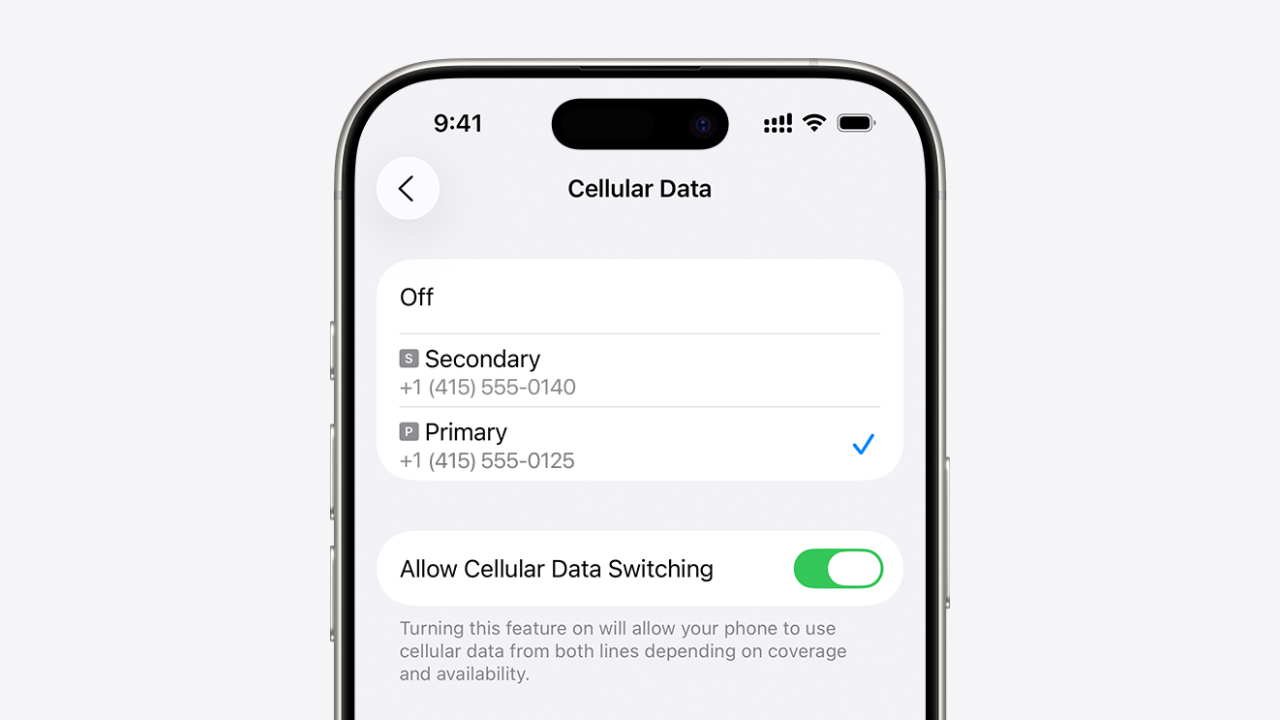
With two lines active, iPhone asks which is the default for calls, messages and data, and lets you set it per contact. Worth doing deliberately during a trial — otherwise cellular data may quietly run over the line you were trying to test, or the one you were trying to leave.

Where it goes wrong

ProblemUsual cause
New eSIM will not installPhone still locked to the old carrier
Port rejectedAccount number or transfer PIN does not match the old account
Port rejectedName or address does not match the old account exactly
Number never arrivesOld line was cancelled before the port started
No data after switchingCellular data still set to the old line
Cannot activate at allDevice reported lost or stolen, or an unpaid balance flagged the IMEI
Almost every failed port comes down to a mismatch with the old account rather than anything wrong with the phone.

A transfer PIN is not your account password. Most carriers make you generate one specifically for porting, it expires, and an expired PIN is the most common single reason a port bounces. Generate it the same day you switch.

The short version: leave the old line alone, get the account number and a fresh transfer PIN, install the new eSIM alongside rather than instead, and delete nothing until the new line rings.

Test the network before you port anything

Free eSIM trials on every major carrier — a second line on your existing phone, with your real number untouched.

See all free trials
#eSIM #Switching #iPhone
Jean Gilles
About the author

Jean Gilles has researched personal finance, consumer technology, and wireless pricing for over a decade. He founded ShopCellPlans in 2019 and writes every review on the site.

Frequently asked questions

How do I transfer my eSIM to a new carrier? +
You do not move the eSIM itself — the new carrier issues a new one and ports your number across. Sign up with the new carrier, choose to transfer your existing number, supply your old account number and transfer PIN, install the new eSIM, and leave the old line active until the port completes.
Will I lose service while switching? +
Usually not. The old line stays active until the port completes, at which point it drops and the new one takes over. Gaps are typically minutes, and the main cause of a long outage is cancelling the old service before starting.
What is a transfer PIN and where do I get one? +
A short code your current carrier generates specifically for porting out, separate from your account password. Get it from the carrier's app, website or support line. It expires, so generate it on the day you plan to switch.
Can I have two carriers on one iPhone? +
Yes. Modern iPhones store several eSIMs and keep two active simultaneously, so you can add a new carrier's line alongside your existing one and choose which handles calls, messages and data.
Do I need to unlock my iPhone before switching? +
Yes. A phone locked to your current carrier will not accept another carrier's eSIM. Unlock policies vary — some carriers unlock automatically after a set period, others require the device to be paid off and a request submitted.
What happens to my old eSIM? +
It stops working once the port completes, and you can then delete it from Settings. Do not delete it beforehand — wait until the new line is confirmed working.
Can I switch back if I do not like the new carrier? +
Yes, by porting again, though it is easier to avoid the situation: run the new carrier as a second line on a free trial first and only port your number once you are satisfied with the coverage.
Price-change alerts
Get told when your plan’s price changes

One email when a carrier raises rates, drops a plan, or launches a deal worth switching for. No spam, unsubscribe anytime.

Keep reading

All guides
Independent since 2019 · No paid placement, ever Prices re-checked weekly
{{ category }} {{ readLabel }}

{{ title }}

{{ dek }}

{{ avatarEl46 }} {{ authorInitials }}
{{ authorRole }}
Published {{ published }}
Updated {{ updated }}
{{ heroCaption }}
{{ heroCaption }}
{{ category }} {{ readLabel }}

{{ title }}

{{ dek }}

{{ avatarEl46 }} {{ authorInitials }}
{{ authorName }}
{{ authorRole }}
Published {{ published }}
Updated {{ updated }}
{{ category }} {{ readLabel }}

{{ title }}

{{ dek }}

{{ avatarEl46 }} {{ authorInitials }}
{{ authorName }}
{{ authorRole }}
Published {{ published }}
Updated {{ updated }}
{{ category }} {{ readLabel }}

{{ title }}

{{ dek }}

{{ avatarEl46 }} {{ authorInitials }}
{{ authorName }}
{{ authorRole }}
Published {{ published }}
Updated {{ updated }}
{{ heroCaption }}
{{ category }} {{ readLabel }}

{{ title }}

{{ dek }}

{{ avatarEl46 }} {{ authorInitials }}
{{ authorName }}
{{ authorRole }}
Published {{ published }}
Updated {{ updated }}

{{ intro }}

Key takeaways
{{ t }}

{{ b.text }}

{{ b.text }}

{{ b.text }}

  • {{ li }}
  1. {{ li }}

{{ b.text }}

— {{ b.cite }}
{{ b.title }}
{{ b.text }}
{{ c }}
{{ cell }}
{{ b.caption }}
{{ b.imgEl }}
{{ b.caption }}
{{ b.title }}

{{ b.text }}

{{ b.label }} →
#{{ tag }}
{{ avatarEl64 }} {{ authorInitials }}
About the author

{{ authorBio }}

Frequently asked questions

{{ f.q }} +
{{ f.a }}
Price-change alerts
Get told when your plan’s price changes

One email when a carrier raises rates, drops a plan, or launches a deal worth switching for. No spam, unsubscribe anytime.

Sources
  1. {{ s.label }} {{ s.label }}

Keep reading

All guides